Showing posts with label C#. Show all posts

Thursday, January 7, 2010

Using RDLC files and Microsoft Report Viewer in ASP.NET

Great way to display data is using Microsoft Report Viewer on ASP.NET pages. However you don't want to create a new page for each report you generate. I came across this problem recently and decided that the best way for me would be to create just one page with a report viewer where I could display all my reports.


Now I'm going to show you how i did it...


Step 1

Under root folder I've created "Reports" folder. This is were I'm going to store all my reports (rdlc files) and a default page to display them.


Step 2

Create default.aspx under ~\Reports and place a MicrosoftReportViewer on it.


Step 3

Create new dataset "ReportsDataSet.xsd" under ~\App_Code. Here we are going to define the dataset classes.

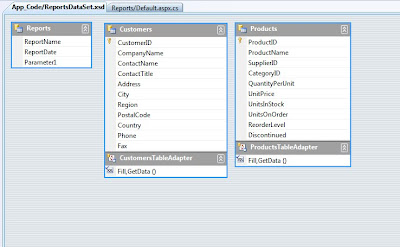
The first datatable we need is for some general report parameters we would like to display on the report. So create a new datatable and add some columns to it. I've created a datatable called "Reports" with 3 columns - ReportName, ReportDate and Parameter1. I also addes some tables from Northwind database. Just drag and drop from server explorer.

Now it should look like this.


Step 4

Create a new report under ~\Reports lets call it "CustomersReport.rdlc"

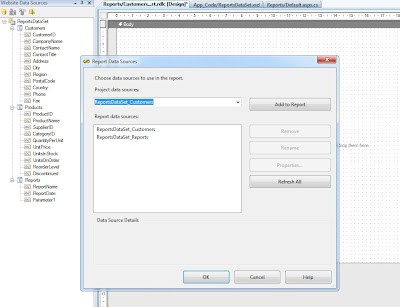
Goto Report - Data Sources and add ReportDataSet_Reports and ReportDataSet_Customers to your report sow we can use them.


Step 5

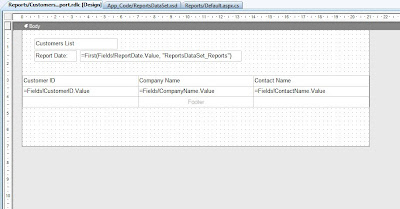
Design your report using selected datasources.


Step 6

Open ~\Reports\default.aspx.cs and enter the following code.

This is a method which loads "CustomersReport" in here you can load all the reports you wish.

private void ShowReport(string Report_Name, string Parameter1)
    {
        //path for your reports
        string path = HttpContext.Current.Server.MapPath("~/Reports/");

        ReportViewer1.Reset(); //important
        ReportViewer1.ProcessingMode = Microsoft.Reporting.WebForms.ProcessingMode.Local;
        Microsoft.Reporting.WebForms.LocalReport r = ReportViewer1.LocalReport;
        r.ReportPath = path + Report_Name + ".rdlc";
        Microsoft.Reporting.WebForms.ReportDataSource rds;


        // fill data parameters table so we can use it on reports
        DataTable dtReports = new ReportsDataSet.ReportsDataTable();
        DataRow drReports = dtReports.NewRow();
        drReports["ReportName"] = Report_Name;
        drReports["ReportDate"] = DateTime.Now;
        drReports["Parameter1"] = Parameter1;
        dtReports.Rows.Add(drReports);

        // add parameters table to report data source
        rds = new Microsoft.Reporting.WebForms.ReportDataSource();
        rds.Name = "ReportsDataSet_Reports";
        rds.Value = dtReports;
        r.DataSources.Add(rds);


        if (Report_Name == "CustomersReport")
        {
            ReportsDataSet.CustomersDataTable dtCustomers = new ReportsDataSet.CustomersDataTable();
            ReportsDataSetTableAdapters.CustomersTableAdapter ad = new ReportsDataSetTableAdapters.CustomersTableAdapter();
            ad.Fill(dtCustomers);

            rds = new Microsoft.Reporting.WebForms.ReportDataSource();
            rds.Name = "ReportsDataSet_Customers";
            rds.Value = dtCustomers;
            r.DataSources.Add(rds);
        }
    }


Now you can call this method within the ~\Reports\default.aspx page or you can call from other pages passing parameters. For that you will need this extra code.
protected void Page_Load(object sender, EventArgs e)
    {
        if (!IsPostBack)
        {
            string reportName = null;
            string parameter1 = null;

            if (this.Request.QueryString["ReportName"] != null)
                reportName = this.Request.QueryString["ReportName"];

            if (this.Request.QueryString["Parameter1"] != null)
                reportName = this.Request.QueryString["Parameter1"];

            if (reportName != null)
            {
                ShowReport(reportName, parameter1);
            }
        }
    }


I'm just going to put a link on the home page to test that all works fine.
<a href="Reports/Default.aspx?ReportName=CustomersReport">Customers Report</a>


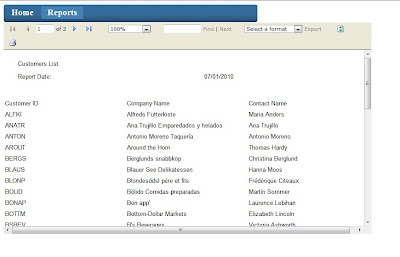
Here is the result.
Thursday, November 26, 2009

Mega Dropdown Menu with ASP.NET and jQuery in C#

Recently I've been asked to create a mega menu on an ASP.NET website which was using a standard ASP.NET menu control. Luckily for me I came accross an article how to create a jQuery Mega Menu.

What I wanted to do is to combine the jQuery Mega Menu with standard ASP.NET menu using sitemap datasource.

Let's build a new website project from scratch so you can see clearly what you need to do to get your mega menu working with asp.net menu.

I'm going to repeat here some steps which are in the jQuery Mega Menu article

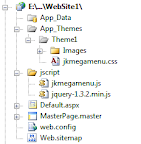
You need to download the following files and place them inside your website project.

- jkmegamenu.css - place this file in yoursite\App_Themes\Theme1\jkmegamenu.css
- jkmegamenu.js - place this file in yoursite\jscript\jkmegamenu.js
- jquery-1.3.2.min.js - place this file in yoursite\jscript\jquery-1.3.2.min.js


Step 1: Create a new master page. In the head tag you need to enter the following

<head runat="server">
<title>My Site</title>
<script type="text/javascript" src="jscript/jquery-1.3.2.min.js"></script>
<script type="text/javascript" src="jscript/jkmegamenu.js">
/***********************************************
* jQuery Mega Menu- by JavaScript Kit (www.javascriptkit.com)
* This notice must stay intact for usage
* Visit JavaScript Kit at http://www.javascriptkit.com/ for full source code
***********************************************/
</script>
</head>


Step 2: Now create a web.sitemap which will be used as our datasource for the menu.

<?xml version="1.0" encoding="utf-8" ?>
<siteMap xmlns="http://schemas.microsoft.com/AspNet/SiteMap-File-1.0" >
<siteMapNode url="~" title="Root"  description="">
<siteMapNode url="~/Default.aspx" title="Page1"  />
<siteMapNode url="~/Default2.aspx" title="Page2" >
<siteMapNode url="~/Default2_1.aspx" title="Page2_1" >
<siteMapNode url="~/Default2_1_1.aspx" title="Page2_1_1" />
<siteMapNode url="~/Default2_1_2.aspx" title="Page2_1_2" />
<siteMapNode url="~/Default2_1_3.aspx" title="Page2_1_3" />
</siteMapNode>
<siteMapNode url="~/Default2_2.aspx" title="Page2_2" >
<siteMapNode url="~/Default2_2_1.aspx" title="Page2_2_1" />
<siteMapNode url="~/Default2_2_2.aspx" title="Page2_2_2" />
<siteMapNode url="~/Default2_2_3.aspx" title="Page2_2_3" />
<siteMapNode url="~/Default2_2_4.aspx" title="Page2_2_4" />
<siteMapNode url="~/Default2_2_5.aspx" title="Page2_2_5" />
</siteMapNode>
<siteMapNode url="~/Default2_3.aspx" title="Page2_3" >
</siteMapNode>
</siteMapNode>
<siteMapNode url="~/Default3.aspx" title="Page3" >
</siteMapNode>
<siteMapNode url="~/Default4.aspx" title="Page4" >
</siteMapNode>
</siteMapNode>
</siteMap>


Step 3: Enter the following code in the master page within the form tag. Here we have our menu bound to SiteMapDataSource. We need to generate anchors ("anchorLiteral") and also html code for our mega menus ("menuLiteral"). I set the menu to fire OnDataBound event. Inside this event we can generate all the required code.

<asp:Literal ID="anchorLiteral" runat="server"></asp:Literal>
<asp:Literal ID="menuLiteral" runat="server"></asp:Literal>
<asp:Menu ID="Menu1" runat="server" StaticDisplayLevels="1" 
MaximumDynamicDisplayLevels="2" DataSourceID="SiteMapDataSource1" 
Orientation="Horizontal" OnDataBound="Menu1_DataBound">
</asp:Menu>
<asp:SiteMapDataSource ID="SiteMapDataSource1" runat="server" 
ShowStartingNode="False" />


Step 4: Now we need to write the code behind the master page. The code loops through the menu items and generates required html code and scripts to get basic menu with mega menu dropdown.

protected void Menu1_DataBound(object sender, EventArgs e)
    {
        //hide the asp menu
        Menu1.Visible = false;
        
        //holds html anchors
        anchorLiteral.Text = "";

        //holds html mega dropdown menu
        menuLiteral.Text = "";

        //register megamenu script and create anchor foreach top level

        StringBuilder mScript = new StringBuilder();
        StringBuilder anchorText = new StringBuilder();
        StringBuilder menuText = new StringBuilder();

        mScript.AppendLine(@"<script type='text/javascript'>");
        int cntLvl1 = 0;
        
        foreach (MenuItem lvl1 in Menu1.Items)
        {
            cntLvl1++;
            string anchorId = "megaanchor" + cntLvl1.ToString();
            string megamenuId = "megamenu" + cntLvl1.ToString();

            //anchor for each top level menu
            anchorText.AppendLine("<a href='" + lvl1.NavigateUrl + "' id='" +
                anchorId + "' class='topMenuCMSListMenuLinkHighlighted'>" +
                lvl1.Text + "</a>");

            //building mega menu div if menuitem has children
            if (lvl1.ChildItems.Count > 0)
            {
                int cntLvl2 = 0;
                //script for each top level menu
                mScript.Append(@"jkmegamenu.definemenu('" + anchorId + "', '" + 
                    megamenuId + "', 'mouseover');");

                menuText.AppendLine("<div id='" + megamenuId + "' class=megamenu>");
                
                //building columns within the mega menu
                foreach (MenuItem lvl2 in lvl1.ChildItems)
                {
                    cntLvl2++;
                    menuText.AppendLine("<div class='column'>");
                    menuText.AppendLine("<h3><a href='" + lvl2.NavigateUrl + "'>" + 
                        lvl2.Text + "</a></h3>");

                    //create ul list if any children
                    if (lvl2.ChildItems.Count > 0)
                    {
                        menuText.AppendLine("<ul>");
                        foreach (MenuItem lvl3 in lvl2.ChildItems)
                        {
                            menuText.AppendLine("<li><a href='" + lvl3.NavigateUrl + "'>" + 
                                lvl3.Text + "</a></li>");
                        }
                        menuText.AppendLine("</ul>");
                    }

                    menuText.AppendLine("</div>");

                    //break after 2 columns
                    if (cntLvl2 >= 2)
                    {
                        menuText.AppendLine("<br style='clear: left' />");
                        cntLvl2 = 0;
                    }
                }
                menuText.AppendLine("</div>");
            }
        }

        anchorText.AppendLine("</ul>");

        anchorLiteral.Text = anchorText.ToString();
        menuLiteral.Text = menuText.ToString();
        mScript.AppendLine(@"</script>");
        Guid gid = System.Guid.NewGuid();

        Page.ClientScript.RegisterStartupScript(this.GetType(), gid.ToString(), mScript.ToString());

    }


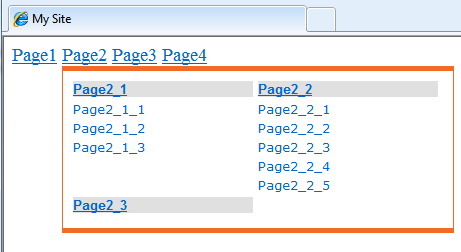
Now here is the result.....